An on-premise queue management system allows an organization to manage customer flow using queue management software and infrastructure hosted within its own environment. Queue data, user accounts, operational rules and system integrations remain under the organization’s direct control rather than being hosted in a vendor-managed public cloud.
This model is commonly considered by banks, government agencies, healthcare providers, telecom operators and other regulated organizations with specific requirements for data residency, network isolation, security governance or integration with internal systems.
However, choosing on-premise queue management involves more than placing a server inside a data centre. The organization must plan the complete operating environment: ticketing hardware, queue-management software, staff terminals, digital signage, networking, database infrastructure, backups, security controls, monitoring, software updates and technical support.
This guide explains how an on-premise queue management system works, when it may be appropriate and what organizations should evaluate before deployment.
What Is an On-Premise Queue Management System?
An on-premise queue management system is installed on servers or virtual infrastructure controlled by the organization. Branch devices connect to that environment through an internal network, private WAN, VPN or another approved connection.
A complete on-premise system may include:
- Ticket-dispensing kiosks
- Central queue-management software
- Browser-based staff terminals
- Counter displays and customer screens
- Appointment-management capabilities
- Digital or mobile queue channels
- Customer-feedback tools
- Operational dashboards and reports
- Application programming interfaces for enterprise integrations
- Locally hosted databases, authentication and audit logs
The queue-management platform coordinates the customer visit from arrival to service completion. It issues a ticket, assigns the customer to the appropriate queue, applies priority and routing rules, sends the ticket to an authorized employee and records the resulting waiting and service times.
In an on-premise architecture, these events are processed and stored within the infrastructure approved by the organization.
Wavetec’s Full-Stack Approach to On-Premise Queue Management
Wavetec is a global full-stack customer-experience technology company with more than 30,000 systems deployed across over 80 countries.
Unlike providers focused only on software or ticketing hardware, Wavetec develops and integrates the different layers required for an enterprise queue-management environment. These include ticketing kiosks, queue orchestration, staff interfaces, digital signage, reporting, analytics, appointment management, virtual queuing and enterprise integrations.
For an on-premise deployment, Wavetec can combine:
- Spectra Queue Management System for queue orchestration, routing rules and transaction records
- Spectra 2.0 for live customer-flow analytics, AI Traffic Forecasting and operational simulation
- WebTSU for browser-based ticket calling and counter management
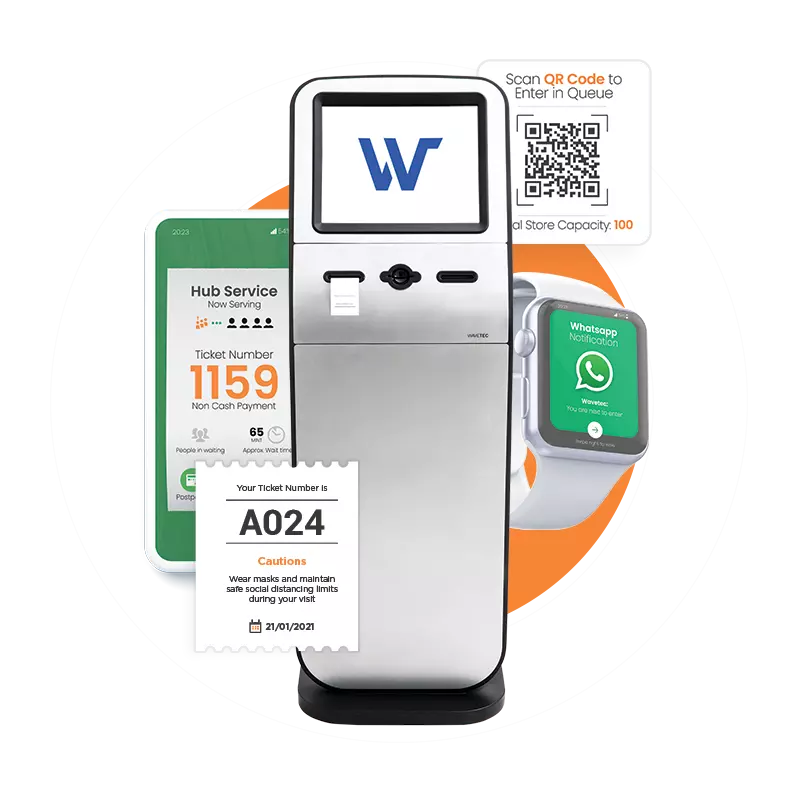
- F-19, M-18 and other ticketing kiosks for service selection and ticket issuance
- Donatello Digital Signage for ticket calls, counter guidance and service information
- Appointment and virtual-queue channels for scheduled and remote access
- Nexia Reports for centralized operational reporting and analysis
- APIs and integration services for approved CRM, core banking, identity, appointment and case-management systems
This full-stack model gives enterprises one technology partner across hardware, software, integration, deployment and lifecycle support. The final architecture can be adapted to the organization’s infrastructure, security policies and operational requirements.
How Does an On-Premise Queue Management System Work?
A typical customer visit follows six connected stages which makes the system work.
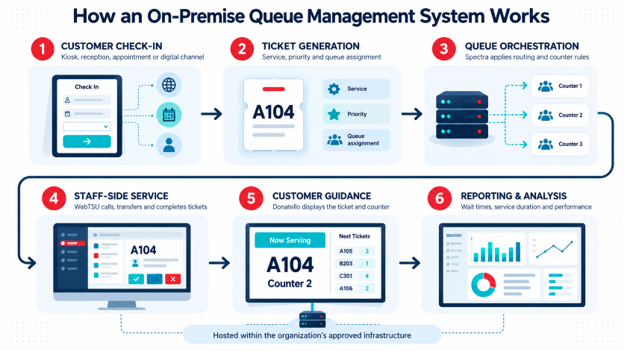
1. Customer Check-In
The customer selects a service through a ticketing kiosk, reception terminal, appointment channel or approved digital interface.
The system can ask for information such as service type, appointment reference, customer category, language or priority status. The amount of information collected should be limited to what is operationally necessary.
2. Ticket Generation
Spectra creates a ticket and places it in the appropriate queue. The ticket may contain a letter identifying the service and a number showing the customer’s position.
Queue rules can separate customers by service, branch area, appointment status, priority level or employee skill.
3. Queue Orchestration
The central Spectra engine evaluates queue position, priority rules, counter availability and employee capabilities.
Rather than maintaining one physical line, the platform can manage multiple queues and route each customer to a suitable service point.
4. Staff-Side Service
Employees use WebTSU through an approved browser to call the next ticket, transfer a customer, place a ticket on hold or complete the interaction.
Because the interface is browser-based, the organization can control access through its approved network and endpoint-security policies.
5. Customer Guidance
Donatello-powered digital signage displays the called ticket and destination counter. Audio announcements, directional information and multilingual content can also be configured according to the environment.
6. Reporting and Analysis
Each ticket creates operational timestamps, including:
- Ticket-issue time
- Ticket-call time
- Service-start time
- Service-end time
- Transfer, cancellation or no-show status
These events allow authorized managers to analyze customer arrivals, waiting times, service duration, counter utilization, service-level performance and branch activity.
Want to see the full on-premise stack working together across branches?
Why Do Organizations Choose On-Premise Queue Management?
On-premise deployment is not automatically better than cloud deployment. It is appropriate when it matches the organization’s governance, technical and operational requirements.
Greater Control Over Data Location
Some organizations require customer-flow and operational data to remain within a specific country, data centre or controlled network.
An on-premise architecture gives the organization direct control over where databases, logs, backups and application services are hosted. This can be important in banking, government and healthcare environments where data-location requirements are defined by regulators, contracts or internal policies.
The growing importance of data sovereignty illustrates why deployment location remains a strategic concern. Gartner forecasts that worldwide sovereign cloud IaaS spending will reach US$80.4 billion in 2026, up 35.6% from 2025. Gartner expects governments to be the main buyers, followed by regulated industries and critical infrastructure such as energy and telecoms.
Integration with Internal Systems
An on-premise queue management system can connect with applications that are not exposed to the public internet, such as:
- Core banking platforms
- Internal appointment systems
- Hospital information systems
- Customer relationship management platforms
- Identity and access-management systems
- Government case-management applications
- Local reporting databases
- Internal directory services
These integrations still require proper authentication, encryption, network segmentation and access controls. Hosting applications locally does not make an insecure integration safe.
Operation Within Controlled Networks
Organizations may require branch systems to operate through private networks or continue providing core queuing functions when external internet connectivity is unavailable.
A properly designed on-premise system can keep local ticketing, calling and customer-display functions within the approved network. Features that depend on external communication, such as public mobile channels, cloud messaging services or off-site notifications, may still require internet connectivity or controlled gateways.
Direct Control Over Updates
On-premise deployment allows the organization to test software updates within its own change-management process before introducing them into production.
This can be valuable where every application change requires security testing, business approval, scheduled maintenance and rollback planning.
However, greater control also creates responsibility. Delaying updates indefinitely can expose the system to avoidable security and compatibility risks.
On-Premise Does Not Automatically Mean More Secure
Security depends on architecture and operations, not simply on where the server is located.
A locally hosted system can still be exposed through:
- Weak passwords
- Excessive user privileges
- Unpatched operating systems
- Insecure APIs
- Poor network segmentation
- Unencrypted backups
- Shared administrator accounts
- Inadequate log monitoring
- Unsupported software
- Physical access to servers
- Misconfigured remote-support connections
IBM’s Cost of a Data Breach Report 2026 puts the global average cost of a breach at US$4.99 million, a record high. Breaches can involve data spread across public cloud, private cloud and on-premises infrastructure, so the relevant question is therefore not whether data is “inside” or “outside,” but whether access, configuration, monitoring and incident response are properly governed.
An enterprise on-premise QMS should therefore include:
- Role-based access control
- Individual user accounts
- Strong authentication
- Least-privilege permissions
- Encrypted communication
- Segmented application and device networks
- Audit logs
- Backup and recovery procedures
- Patch-management responsibilities
- Security monitoring
- Controlled vendor access
- Tested incident-response procedures
On-Premise Versus Cloud Queue Management
| Consideration | On-premise deployment | Cloud deployment |
|---|---|---|
| Infrastructure | Hosted in the organization’s approved environment | Hosted in an approved cloud environment |
| Data location | Controlled directly by the organization | Determined by the selected cloud region and architecture |
| Maintenance | Shared between internal IT and the technology provider | More infrastructure responsibility rests with the provider |
| Updates | Can follow internal approval and release schedules | Can generally be delivered more centrally |
| Integration | Suitable for private and locally hosted systems | Suitable for web-based systems and open APIs |
| Connectivity | Core local functions may operate within the internal network | Reliable external connectivity is usually more important |
| Scaling | Requires planned infrastructure capacity | Capacity can often be expanded more dynamically |
| Security | Depends on internal controls and operational maturity | Depends on cloud controls, provider controls and customer configuration |
| Disaster recovery | Designed and maintained by the organization and provider | Can use cloud-region and provider-managed recovery options |
| Best suited for | Strict data control, local integrations and regulated environments | Rapid deployment, centralized updates and distributed scalability |
The decision should not be based on a general belief that one model is always safer or less expensive. Organizations should compare cloud and on-premise queue management against the same requirements, sites, devices, integrations, support model, retention period and service levels.
A hybrid queue management design may also be appropriate. For example, ticket processing and sensitive operational data may remain on-premise while selected reporting or customer-notification services operate through an approved cloud environment.
Can AI Work in an On-Premise Queue Management Environment?
Yes, but the architecture and infrastructure requirements must be confirmed during solution design.
Spectra 2.0 extends conventional queue reporting with:
- Live Branch Summary to identify developing service problems
- Branch Waiting Dashboard to distinguish arrival pressure, long service times and routing issues
- AI Traffic Forecasting to estimate future ticket demand
- Inflow Simulation to test staffing, counter and routing configurations before implementation
The platform is designed to support customer-controlled enterprise deployment patterns, including environments that use audited file transfer instead of direct cross-boundary database access.
AI forecasting still requires sufficient, consistent historical data. Organizations must also define:
- Which data the model can use
- Where training and inference take place
- Who can access forecasts
- How accuracy is measured
- How forecast errors are reviewed
- Whether data can cross network or national boundaries
- What happens when the predictive service is unavailable
AI in queue management should support operational decisions rather than make uncontrolled staffing or customer-priority decisions.
What Infrastructure Does an On-Premise QMS Require?
The precise architecture depends on the number of sites, transaction volume, integrations and availability requirements. A typical enterprise deployment may require:
Application Environment
- Physical or virtual application servers
- Database servers
- Supported operating systems
- Load balancing for high-availability environments
- Test and production environments
- Storage for transactions, logs and reports
Branch Infrastructure
- Ticket-dispensing kiosks
- Counter computers or approved browser endpoints
- Digital-signage players and displays
- Local network connectivity
- Optional printers, scanners and customer-identification devices
Network Architecture
- Secure communication between branches and the central environment
- Firewalls and access-control rules
- Network segmentation
- VPN or private WAN connectivity
- Monitoring of device and application availability
- Controlled internet gateways for approved external services
Continuity and Recovery
- Database backups
- Application backups
- Defined recovery-time and recovery-point objectives
- Secondary infrastructure where required
- Failover and restoration testing
- Documented offline or degraded-service procedures
An on-premise deployment should not be approved until ownership is assigned for every layer. The organization and technology provider must clearly define who manages servers, databases, networks, backups, certificates, security alerts, operating-system updates and application releases.
Enterprise Queue Management at Scale
Wavetec’s experience includes customer-flow deployments across large and distributed service networks.
UBL
United Bank Limited expanded its Wavetec Enterprise Queue Management System from 661 equipped branches by adding another 400 installations, bringing the deployment to 1,300+ branches.
The environment uses Spectra and self-service ticketing to create consistent queue operations and centralized visibility across the network.
Faysal Bank
Faysal Bank deployed Wavetec’s Enterprise Queue Management System across 351 branches.
The platform provides centralized oversight, ticket-based customer routing, digital signage and branch-performance information across the equipped network.
St. Lucie County
The St. Lucie County Tax Collector’s Office implemented a Wavetec Customer Flow Management ecosystem combining Spectra dashboards, Lobby Leader, appointments, SMS updates, QR-based virtual queuing and Donatello signage across three branches.
These projects demonstrate how the same underlying platform can be configured for banking, government and other enterprise service environments. Deployment architecture and results differ by organization and should be validated for each project.
What Should Buyers Check Before Selecting an On-Premise QMS?
Before approving a system, organizations should evaluate the following areas.
1. Deployment Architecture
- Will the system be centralized, branch-based or hybrid?
- Where will application and database servers be hosted?
- How will branches connect to the central environment?
- Is high availability required?
2. Customer Visit Flow
- Which services require separate queues?
- Are appointments and walk-ins managed together?
- Are priority customers handled through controlled rules?
- Can customers wait remotely?
- Are multilingual interfaces required?
3. Product Components
- Which ticketing kiosk is suitable for each location?
- How will employees call and transfer tickets?
- What information will appear on displays?
- Are customer-feedback tools required?
- Which reporting and forecasting modules are needed?
4. Integrations
- Which enterprise platforms must exchange data with the QMS?
- Are APIs available?
- What authentication method will be used?
- How will failed transactions be retried and reconciled?
- Which system owns the authoritative customer record?
5. Security and Privacy
- Where will customer and operational data be stored?
- Which fields are genuinely necessary?
- How will access be approved and reviewed?
- Are user activity and configuration changes logged?
- How are backups encrypted and protected?
6. Support and Ownership
- Who monitors application and device availability?
- Who maintains the server and database?
- Who applies security patches?
- Which team handles branch-device failures?
- Are spare parts and field engineers available?
- What service levels and escalation paths apply?
7. Reporting and AI Readiness
- Which operational metrics are required?
- Are definitions consistent across branches?
- Is historical data complete enough for forecasting?
- Can the organization validate forecast accuracy?
- How will managers act on alerts and predictions?
Relevant Wavetec Certifications
Wavetec’s organizational security and quality certification includes:
- ISO/IEC 27001:2022 certification for information-security management
- ISO 9001:2015 certification for quality-management processes
- SOC 2 Certification
- GDPR-aligned data-handling practices where applicable
These credentials support Wavetec’s overall governance framework. They do not automatically make every customer deployment compliant with every regulation. Final compliance depends on the approved architecture, configuration, integrations, access controls and operating procedures.
Is an On-Premise Queue Management System Right for You?
An on-premise queue management system can give an organization direct control over infrastructure, data location, integrations and release management. It can be particularly suitable for regulated enterprises, private networks and environments that depend on internal systems.
That control comes with operational responsibility. Servers must be maintained, databases protected, backups tested, updates governed and security events monitored. A locally hosted system is only as reliable as the architecture and processes supporting it.
Wavetec brings together Spectra, Spectra 2.0, WebTSU, ticketing kiosks, Donatello Digital Signage, reporting, virtual queuing and enterprise integration within a full-stack customer-flow platform. The solution can be designed for on-premise, cloud or hybrid deployment according to the organization’s approved requirements.
Contact Wavetec to discuss an on-premise queue management system for banking, government, healthcare, telecom or enterprise service environments.
Keep queue data inside your own network
See how Spectra, ticketing kiosks and Donatello run in an on-premise or hybrid setup.