19 min read | Updated on: 23 Oct 2026
|
Quick answer: The difference in a cloud vs on-premise queue management system is where it runs and who runs it. A cloud queue management system runs on servers the vendor hosts, and you reach it over the internet. An on-premise queue management system runs on servers your organization owns and operates, in a branch or your own data center. Cloud usually costs less to start and is easier to run across many branches. On-premise gives you direct control over data and hosting. Hybrid splits the work between the two. The right choice depends on your data rules, internet reliability, integrations and IT capacity, not on the label. |
|
In a hurry?
|
Choosing between cloud and on-premise is one of the first decisions in any queue management system project. It shapes what you pay up front, who patches the servers, where customer data lives and what happens when the branch internet drops.
The terms are often used loosely. In its shared responsibility guidance (updated August 2026), Microsoft shows that the customer owns its data, user accounts and access rules in every model, on-premise or cloud. What moves to the provider is the hardware, the hosting and, in software as a service, the application itself.
Wavetec has deployed more than 30,000 systems in over 80 countries since 1986, and offers its queue management software as multi-tenant cloud or on-premise. This guide compares the two models side by side, then covers cost, security, outages, integrations and real deployments, so your operations, IT and procurement teams can agree on one answer. For the wider topic, see the queue management blog.
What Is the Difference Between Cloud and On-Premise Queue Management?
The difference is where the queue software runs and who operates it. Everything the customer sees, from the ticket to the counter display, can look exactly the same in both models.
Cloud Queue Management
A cloud queue management system runs on servers the vendor or its hosting partner operates. Branch staff, kiosks and screens connect to it over the internet, so no application server sits in each branch. Managers sign in to one central console to change service rules, add branches and read reports.
If you want a full introduction to how hosted queuing works, read our guide to the cloud-based queue management system. This article focuses on the choice between hosting models.
On-Premise Queue Management
An on-premise queue management system runs on servers your organization controls. That can be a server in each branch or one central server in your data center that serves every location. You do not need a separate server at every site.
Your team, or a support partner you contract, handles capacity, monitoring, patches, backups and recovery. That gives you direct control, and it also gives you clear responsibility for keeping the system running.
Hybrid Queue Management
A hybrid design splits functions between local and hosted environments. A common pattern keeps ticketing and counter calling on a local server, while reporting, appointment booking and SMS or WhatsApp queuing run in the cloud.
Hybrid only helps if the vendor supports that exact split. Ask for an architecture diagram showing each component, where it runs, how data moves between them and who supports it. A local kiosk connected to a cloud server does not, on its own, mean the queue keeps running locally.
Cloud Hosting Is Not the Same as SaaS
Two cloud offers can mean very different amounts of work for your team. In software as a service, the vendor runs the application, the operating system and the hosting. If a vendor installs its software on servers you rent from a cloud provider, your team or partner may still patch and manage it.
The NIST definition of cloud computing separates these service models (software, platform and infrastructure as a service). When you compare proposals, write down who manages each layer rather than relying on the word “cloud”.
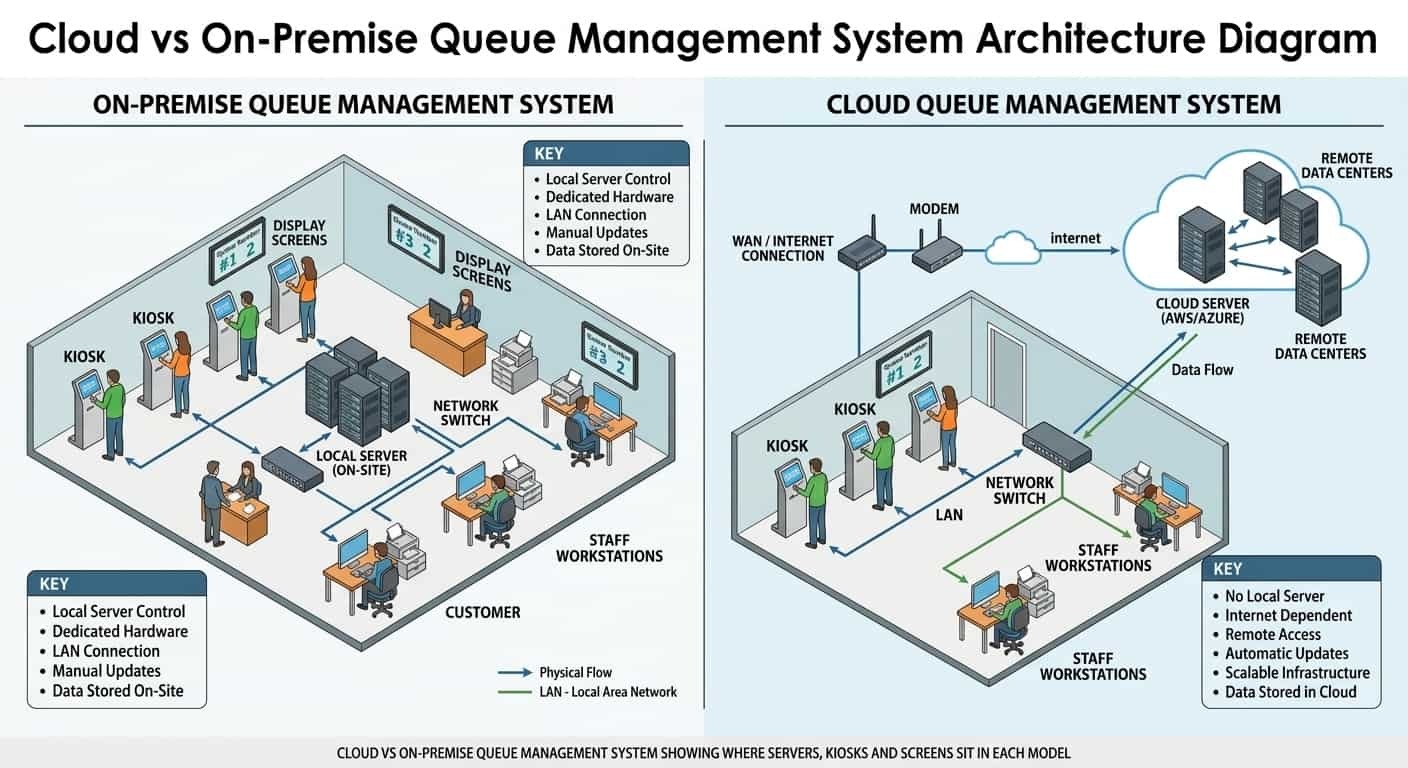
Cloud vs On-Premise QMS: Side-by-Side Comparison
The table compares a vendor-managed cloud QMS with an on-premise installation your organization runs. Use it as a checklist for proposals, then confirm the exact split of duties in each contract.
| Factor | Cloud queue management | On-premise queue management |
|---|---|---|
| Where the software runs | Vendor-hosted servers, reached over the internet | Your servers, in a branch or your data center |
| Upfront cost | Lower: no server purchase; you pay setup and subscription fees | Higher: server hardware, licenses and installation |
| Ongoing cost | Subscription, support scope, connectivity | Maintenance, internal IT time, server replacement |
| Updates and patches | Vendor applies them; confirm notice and testing | Your team schedules, tests and applies them |
| Adding branches | Configure a new site centrally; check subscription limits | Check server capacity, licenses and network links |
| Data location | Vendor hosting region; confirm it meets your rules | Inside your own environment |
| Internet outage | Depends on local fallback; must be tested | Branch keeps running if the server is local; external SMS or links may still stop |
| Integrations | Secure connection from the cloud to your internal systems | Network access, authentication and compatibility inside your network |
| Best fit | Multi-branch networks, lean IT teams, fast rollout | Strict data rules, unreliable internet, in-house IT capacity |
What Stays the Same in Every Deployment?
The hardware and the customer visit stay the same. Moving the software to the cloud does not remove the equipment in the branch, so both proposals need to cover it.
A branch using ticket dispensers or self-service kiosks still needs installation, power, network, paper and a maintenance plan. The same goes for Donatello media players, counter displays and call-forward units for linear queuing.
A simple test catches most gaps: follow one customer from booking to the end of service and write down every device, application and network link involved. That list shows needs that a server-only comparison misses.
Include customers who cannot use a smartphone or a touch screen. Test staff-assisted check-in, readable displays and spoken calling in both models. The WCAG 2.2 guidelines apply to web content on kiosks and phones as well as desktops, so ask each vendor how its booking pages and kiosk screens meet them.
How Each Model Works During a Customer Visit
The same five steps happen in every deployment. What changes is where each step is processed.
- Booking or joining remotely. The customer books through online appointment scheduling or joins a virtual queue from a phone. In cloud and most hybrid designs this runs on hosted servers. In a pure on-premise setup, the booking page must be published from your network.
- Arrival and check-in. The customer scans a QR code or uses a kiosk. The kiosk talks to the queue server, wherever it sits.
- Waiting. Screens, SMS or the mobile queuing app show the place in line. SMS and WhatsApp messages leave through an outside service in every model.
- Calling and service. Staff call the next customer from the counter. Routing rules decide who is served next, based on service type and priority.
- Feedback and reporting. The customer rates the visit and every step is stored for reports. In cloud setups, head office reads one central data set. On-premise networks either report per branch or send data to a central server.
Each step shares data with the next one: the booking reference becomes the ticket, the ticket carries the service type to the counter, and the counter records the service time for reports. Ask each vendor to show this hand-off working in the model it proposes.
Cloud, On-Premise or Both
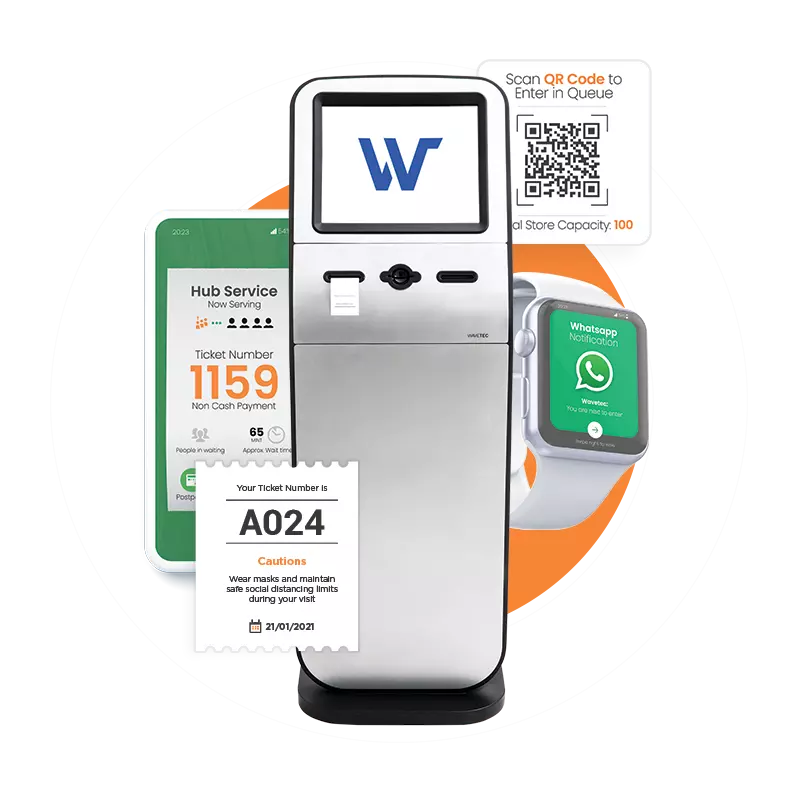
Wavetec’s queue management system runs as multi-tenant cloud or on-premise, with the same kiosks, displays and reports.
Which Costs More: Cloud or On-Premise?
Neither model is always cheaper. Cloud usually costs less to start, while on-premise can cost less over many years for a stable network that already has servers and IT staff. The only fair test is the total cost of the same setup over the same period.
AWS guidance on total cost of ownership recommends counting the cost of operating and managing each component, not only the infrastructure bill. For a QMS, that means counting these items for both proposals:
- Licenses or subscription fees for the same number of sites, counters and users
- Servers, backup storage and their replacement cycle (on-premise)
- Kiosks, printers, displays and their maintenance
- Implementation, integration work and training
- Internal IT hours for patching, monitoring and support
- Connectivity and SMS or WhatsApp message volume
- Planned expansion: what changes when you open the next ten branches
Ask for a base scenario and an expansion scenario in writing. Check what support covers: device replacement, integration fixes, a test environment and after-hours incidents. A proposal can look cheaper simply because essential work sits outside its quote.
Can virtual queues reduce infrastructure costs? They can reduce the number of kiosks and the size of waiting areas, because customers wait outside the branch. They do not remove the queue server, which still needs hosting in one of the two models. Our ROI calculator estimates the return of a queuing project for your branch numbers.
Is On-Premise More Secure Than Cloud?
Not by default. Security depends on how the system is configured and run, not on where the server sits. A well-run cloud platform can be safer than an on-premise server that misses patches, and the reverse is also true.
Start by mapping the data. Write down which customer details enter the QMS, where they travel, who can see them and when they are deleted. Then check the controls described in our guide to queue management system security: role-based access, multi-factor sign-in, encryption and audit logs.
Ask for evidence, not badges:
- The scope and period of the vendor’s SOC 2 Type II report. Our article on SOC 2 compliance for queue systems explains what it covers.
- The scope and validity of its ISO 27001 certificate, and whether it covers the application, not just the hosting provider.
- The hosting region and where backups are stored, if your country sets data-location rules.
- How vendor support staff reach your data, and how that access is logged.
Healthcare does not automatically need on-premise hosting. The US Department of Health and Human Services confirms that a covered entity may use a cloud service for protected health information, provided it signs a HIPAA-compliant business associate agreement and meets the HIPAA rules. Our hospital queue management guide and the hospitals and clinics page cover patient data in more detail.
Wavetec is SOC 2 Type II and ISO 27001 certified, ISO 9001:2015 certified, GDPR compliant and HIPAA compliant. In both deployment options, the queue management system supports role-based access, audit logs, encryption in transit and data-retention controls.
What Happens When the Internet Goes Down?
It depends on where each function runs. An on-premise branch server can keep issuing tickets and calling customers without internet, but SMS, WhatsApp, remote booking and central reports may still stop. A cloud system needs a tested local fallback to keep the branch moving.
Ask each vendor to cut the connection during the demo rather than describe it. Check these functions one by one:
- Ticket printing at the kiosk
- Staff calling the next customer
- Counter and waiting area displays
- Remote joining and SMS updates
- Sign-in for staff and managers
- How tickets issued offline are matched up once the link returns
AWS reliability guidance defines the two targets to agree in writing: recovery time objective, the longest acceptable wait before service is restored, and recovery point objective, the most data you can afford to lose. Set both from the impact on your branches, not from a headline uptime percentage.
Hardware matters too. In the DriveTest Ontario deployment, a single failed printer used to take a kiosk offline. Wavetec’s M-13 kiosks there carry two thermal printers with automatic failover, and ActiveHub monitors device health across 90+ centers from one place.
Will It Connect to Your Existing Systems?
Both models can integrate, but the work is different. A cloud QMS needs a secure route into systems inside your network, such as a core banking platform or a hospital information system. An on-premise QMS sits inside the network but still needs tested interfaces, accounts and permissions.
List every connection before you choose: appointment sources, customer records, staff sign-in, notifications and reporting tools. For each one, note which system owns the data and what the QMS sends or receives. Our guide to queue management system integration explains API and middleware options.
Then ask the vendor to show one real exchange: pull a booked visit, check the customer in, route them and send the service status back. Ask what happens if a check-in succeeds but the reply is lost, and how duplicate visits are prevented. Separate supported connectors from custom work, and agree who maintains each interface after launch.
In Banorte’s branches in Mexico, for example, Wavetec kiosks read the customer’s bank card, identify the account through the bank’s systems and print a priority ticket. That depends on the integration working in the chosen deployment, which is why it belongs in the test plan.
Reporting, AI and Multi-Branch Visibility
Cloud makes network-wide reporting simpler, because every branch writes to one data set. On-premise networks can do the same with a central server, but data from branches with poor links may arrive late.
Spectra reporting offers more than 50 historical reports, real-time dashboards and central configuration. Ask which reports are included in the version offered, how time zones and service names are kept consistent across branches, and whether managers can still see data during a branch outage.
If AI queue management is part of the offer, ask where the forecasting runs, which data it uses and whether it is available in both hosting models. Request sample forecasts on your own visit history before you rely on them. Include Opinion Plus customer feedback data in the same review if you use it.
Real Deployments: What Wavetec Clients Chose
Interbank, Peru: From On-Premise to Cloud Across 120 Branches
Interbank first deployed Wavetec’s queue management system in 2013. When it renewed the contract in January 2026, the bank chose to move to a fully cloud-based deployment across all 120 branches. The Interbank announcement lists the reasons: central management of queue settings, faster scaling without on-premise complexity and real-time visibility of every branch.
DriveTest Ontario, Canada: Continuity at Province-Wide Scale
DriveTest runs more than 90 driver licensing centers. Over a 30-day window, its Wavetec platform handled 93,783 booking, rescheduling and cancellation transactions, with 89.3% completed on the public website. Dual-printer kiosks, central device monitoring and an independently reviewed accessible service show what to ask for when downtime is not an option.
Consum, Spain: Hardware, Apps and Reports Across 500 Sites
The Consum case study reports 500 sites, 47,935 customers served and 52,936 tickets issued on average per day, with an average wait of 4 minutes and 38 seconds. The setup combines ticket kiosks, Donatello signage, Spectra dashboards, the Consum mobile app and integrations with the BI platform and weighing scales.
Trident Technical College, USA: Connected Student Services
At Trident Technical College, students join the queue from the website or by SMS, book appointments for busy services and rate each visit. Administrators follow every visit on real-time dashboards. The case study shows why the choice covers more than hosting: access, staff work, messaging and reports all have to work together.
The case studies report results for each deployment, not proof that one hosting model caused them. For a similar rollout, ask how capacity, integrations and support will be checked against your own volumes.
How to Choose the Right Deployment Model
Start with cloud when you run many branches, want one place to manage them and have a lean IT team, as long as internet, data rules, integrations and support terms meet your needs.
Start with on-premise when a written policy or regulator requires data to stay in your environment, when branch internet is unreliable, or when you already run servers and have staff to maintain them.
Consider hybrid when different functions have different needs, such as local ticketing for resilience with cloud booking and reports. Only choose it if the vendor supports that exact design.
Typical Choices by Industry
- Banking: large networks often move to cloud for central control, as Interbank did. Banks with strict data-location rules keep on-premise or hybrid.
- Healthcare: cloud is allowed under HIPAA with a business associate agreement. Hospitals with patient data in local systems often choose on-premise or hybrid for easier integration.
- Government and DMV: procurement rules, accessibility and data location usually decide. Use the DMV QMS buyer checklist and RFP scoring model to weigh them.
- Retail and education: cloud fits most chains and campuses, because sites are many and on-site IT is thin.
Questions to Ask Every Vendor
- Which deployment models do you support for this product, and are features the same in each?
- Who manages the servers, operating system, application and backups in your proposal?
- Where is our data hosted and backed up, and can you meet our data-location rules?
- Can you show ticketing and calling during an internet outage?
- Which of our integrations are supported connectors and which are custom work?
- What do your SOC 2 report and ISO 27001 certificate cover, and for what period?
- What is the total cost for our sites over five years, including expansion?
- How do we export our data and move to another model or vendor later?
Separate must-haves from preferences before scoring. A required integration, data location or recovery target should be a pass or fail check, so a strong score elsewhere cannot hide it. Our guides on how to choose a queue management system and the types of queue management systems cover the wider selection, and the best queue management systems review compares vendors.
Moving From On-Premise to Cloud: Roll-Out Steps
Many organizations already run an on-premise QMS and plan to move, as Interbank did. Treat the move as a project with clear owners, not an automatic upgrade.
- Take stock. List every branch, kiosk, printer, display, integration and report in use today.
- Check the hardware. Confirm which kiosks and printers work with the new setup before assuming they can be reused.
- Export and map the data. Agree which history moves, how service names map and how long old records are kept.
- Pilot in a busy branch. Choose a site with peak hours, appointments and a key integration, not the easiest one.
- Test failure. Cut the link, restore it and check that tickets and reports match.
- Train by role. Reception, counter staff, supervisors and administrators each need their own session.
- Roll out in waves and keep a rollback plan until each wave is accepted.
Our queue management system implementation guide covers each stage in more depth. Plan the exit at the same time: agree data exports, configuration records and handover support in the contract.
Frequently Asked Questions
Where to Start With Your Deployment Decision
Pick the model your team can run, secure and expand without risking the branch on a bad day. Write down your must-haves, test outages and integrations in the demo, and compare total cost over the same period.
BOOK A FREE DEMO