Updated: | 11 min read
Quick answer: To choose patient flow software, first decide which part of the visit causes your delays: check-in and waiting, beds and discharge, or both. Then score each tool on check-in channels, routing between departments, calling, reporting, HIS or EHR integration, security and local support, and ask every vendor to run your busiest day in a live demo.
In a hurry?
- Patient flow software comes in three kinds: EHR modules, bed and capacity tools, and front-of-visit systems for check-in, queues and calling. Buy for the part of the visit that is slowing you down.
- The features that matter most are one ticket that follows the patient between departments, calling by number, booked and walk-in patients in one system, and reports by department and hour.
- Measure waits before you buy, run a pilot in one busy department, and judge vendors on your own numbers, not their brochure.
Choosing patient flow software is harder than it looks, because the same name is used for very different products. One vendor means bed boards and discharge planning, another means the patient record, and a third means the kiosks, queues and screens patients see when they arrive.
The cost of getting it wrong shows up in the waiting room. In England, the National Audit Office found that only 74.9% of A&E attendances met the four-hour target in 2025-26 (September 2026). In a May 2025 survey of 2,000 Americans by Talker Research for Klara, 52% named waiting more than 30 minutes as a turn-off (Scripps News, December 2025).
This guide is for the people who have to pick a system: operations managers, IT leads and clinic owners. It covers the three kinds of patient flow software, the features to insist on, how to score vendors, the questions to ask, integration, cost and the numbers that prove it worked. If you already know you need the front-of-visit layer, see Wavetec’s patient flow management system for hospitals and clinics.
What Kinds of Patient Flow Software Are There?
Patient flow software falls into three groups, and each one solves a different delay. Knowing which group you need narrows a long vendor list to a short one.
| Type | What it manages | Typical buyers | Example vendors |
|---|---|---|---|
| EHR patient flow modules | Patient records, admissions, orders and discharge inside the electronic health record | Hospitals already running that EHR | Epic, Oracle Health (Cerner) |
| Bed and capacity management | Bed status, transfers, cleaning and hospital-wide capacity | Large inpatient hospitals | TeleTracking |
| Front-of-visit patient flow | Booking, check-in, queues, calling, moves between departments and feedback | Outpatient departments, clinics, labs and pharmacies | Wavetec |
Searches such as Cerner patient flow or Epic patient flow usually come from teams that already run that EHR and want to know what it covers. EHR modules are strong on records and beds, but they rarely run the kiosks, screens and phone alerts in the waiting area. That is why many hospitals connect a front-of-visit system to the EHR rather than choosing one or the other. Our guide to improving patient flow in hospitals covers the bed and discharge side in more detail.
Which Patient Flow Software Features Matter Most?
The features that matter most are the ones your patients and staff touch every hour. Use this list as the minimum for front-of-visit patient flow software, then add what your departments need.
1. Check-in on every channel
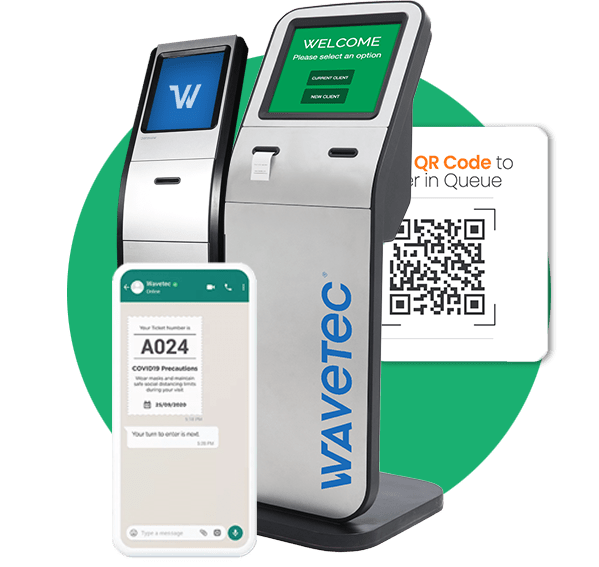
Patients should be able to check in at a healthcare kiosk, at reception, on a phone or on WhatsApp. Digital check-in frees reception staff for the patients who need a person, and walk-ins can join by scanning a QR code.
2. One ticket that follows the patient
The ticket should move from reception to triage, the doctor, the lab and the pharmacy without the patient queuing again. Ask how the system handles a transfer, a return visit to the same room and a patient sent to two departments.
3. Calling by number on screens and phones
Staff should call the next patient from their own screen, with the number shown on room and waiting-area displays and sent to the patient’s phone. Calling by number keeps names and conditions out of public view. Digital signage for hospitals can show directions and health information between calls.
4. Booked and walk-in patients in one system
Appointments and walk-ins should sit in the same queue view, with rules that protect booked slots. Look for online appointment scheduling and WhatsApp appointment booking that feed the same queue, and read our comparison of same-day and walk-in appointments.
5. Waiting outside the building
A virtual waiting room lets patients wait in the cafeteria or their car and come back when their phone tells them to. This keeps waiting areas clear and is one of the easiest wins to measure.
6. Reports by department, hour and site
Managers need waiting time, service time, patients served and patients who left before being called, split by department, hour and site. Our guide to queue management analytics explains which numbers to watch first, and the data is what lets you plan staff for peak hours.
7. Feedback linked to the wait
A short rating after the visit is useful, and far more useful when it sits next to how long that patient waited. That link shows whether complaints come from the wait itself or from something else.
8. Central setup for many sites
Clinic groups should be able to set rules once and apply them everywhere, while each site keeps its own departments and services. Head office then compares waits between branches on one dashboard.
Chapidze Heart Center: From 70 to More Than 200 Patients a Day
How Do You Compare Patient Flow Management Platforms?
Compare patient flow management platforms with a weighted scorecard, so the decision rests on your priorities rather than the best presentation. Score each vendor from 1 to 5 on every row, multiply by the weight and add up the totals.
| Criterion | Suggested weight | What a 5 looks like |
|---|---|---|
| Fit to your patient routes | 20% | Handles your real departments, transfers and priority patients without custom work |
| Patient channels | 15% | Kiosk, reception, phone, WhatsApp and SMS in the languages your patients use |
| HIS or EHR integration | 15% | Documented method, clear data direction, named owner after go-live |
| Reporting | 15% | Waiting and service times by department, hour and site, exportable |
| Hardware and local support | 15% | Vendor supplies, installs and services kiosks and screens near you |
| Security and compliance | 10% | Certifications you can verify, role-based access, audit logs |
| References | 10% | Hospitals or clinics of your size you can call |
Change the weights to suit your situation. A clinic group might raise multi-site reporting; a hospital with an old HIS might raise integration. Whatever you choose, agree the weights before the first demo.
What Questions Should You Ask Patient Flow Software Vendors?
Ask vendors questions that force specific answers about your hospital, not general claims. These ten cover most of the risk:
- Which hospitals or clinics like ours use your system, and can we speak to one?
- How does a ticket move when a patient is sent from the doctor to the lab and back?
- How do you protect appointment slots when walk-ins arrive at the same time?
- Which check-in channels and languages are included, and which cost extra?
- How do you connect to our HIS or EHR, and who fixes the link if it breaks?
- Can we export waiting and service times for our own analysis?
- Who owns the data, where is it stored and which certifications do you hold?
- Do you supply and service the kiosks and screens yourselves, and how fast is on-site support?
- Can we run it in the cloud or on our own servers?
- What does a pilot in one department include, and what happens after it?
Write the answers into your scorecard straight after each call. Vague answers to questions 2, 5 and 8 are the most common warning signs.
How Should Patient Flow Software Connect to Your HIS or EHR?
Patient flow software should read appointments and patient details from your HIS or EHR and send visit times back, so nobody types the same information twice. The common methods are HL7 messages, HL7 FHIR and REST APIs; ask which ones the vendor supports today rather than on its roadmap.
At Nahdi Care Clinics, Wavetec’s Spectra API is connected to the Hospital Information System. A check-in at reception sends the patient a WhatsApp ticket and live position updates, the triage nurse passes the ticket to the assigned doctor, and the visit closes when the doctor ends the service. Our guide to queue management system integration compares the main connection methods.
Security check: patient flow software holds names, phone numbers and visit details. Ask for certifications you can verify and for role-based access, audit logs, encryption in transit and data-retention controls. Wavetec is ISO 27001 certified and HIPAA, SOC 2 and GDPR compliant. For US buyers, the HHS HIPAA guidance sets the baseline, and our article on data security in healthcare covers the rest.
What Drives the Cost of Patient Flow Software?
Patient flow software is usually quoted per project, because every hospital has a different layout and patient volume. The main cost drivers are:
- The number of sites, departments and service points
- Hardware: kiosks, room and counter displays, waiting-area screens and speakers
- Software modules: virtual queuing, WhatsApp, appointments, feedback and analytics
- HIS or EHR integration
- Cloud or on-premise hosting, training and ongoing support
Build your shortlist with real specs
Download the system specs to compare kiosks, displays and software modules side by side, or ask our team to price a setup for your departments.
How Do You Run a Patient Flow Software Pilot?
Run a pilot in one busy department, with numbers measured before and after, so the decision to expand rests on evidence.
- Measure the baseline. Record waiting time, service time and patients served per day for two normal weeks.
- Pick one department. Outpatients or the pharmacy usually show results fastest, because the queues are long and predictable.
- Agree success targets. For example, a shorter average wait at the morning peak and fewer patients leaving before being called.
- Train each role. Reception, nurses and doctors each need only a few actions: call, transfer and end the service.
- Review and decide. Compare the pilot numbers with the baseline, adjust the services and rules, then extend to the next department.
For the steps after the pilot, see hospital automation, which covers the systems beyond the queue.
Which Numbers Prove Patient Flow Software Is Working?
Five numbers show whether patient flow software is working: average wait, service time, patients served per day, patients who left before being called and patient ratings. Compare each one with your baseline by department and hour.
Patients who leave before being called are an early sign of queue abandonment, and benchmarks for average wait times in hospitals help you set realistic targets. Results like these come from Almoosa Specialist Hospital and Liberty Regional Medical Center.
Which Patient Flow Vendors Should Be on Your Shortlist?
Your shortlist should match the delay you are trying to fix, not a generic ranking. If the problem is beds and discharge, start with your EHR vendor’s patient flow module and capacity specialists. If the problem is crowded waiting rooms, missed calls and patients queuing again in every department, shortlist front-of-visit vendors and check how they connect to your EHR.
Wavetec works on the front of the visit. Its patient flow software for hospitals and clinics combines Spectra QMS, self-service kiosks, Mobile-Q, WhatsApp Queueing, Donatello digital signage and Opinion Plus feedback. Wavetec has deployed more than 30,000 systems in over 80 countries since 1986, including hospitals and clinics in Saudi Arabia, Georgia, Ghana, Italy and the United States.
For department-by-department setups, see the hospital queue management system guide, and for pharmacies, Wavetec’s pharmacy queue management page.